A Complete Guide to AEM Component Development
Learn AEM Component Development from scratch with practical examples, Sling Models, HTL, dialogs, Core Components, best practices, and modern AEM Cloud Service architecture.
Introduction
Adobe Experience Manager (AEM) is one of the leading enterprise content management systems used for building scalable and personalized digital experiences. One of the most important concepts in AEM is Component Development.
Components are reusable building blocks that help authors create webpages efficiently using drag-and-drop functionality. Everything visible on an AEM page — whether it is a banner, image, product card, carousel, or navigation menu — is built using components.
In this article, we will explore AEM Component Development, its architecture, structure, best practices, and modern approaches used in AEM as a Cloud Service.
What is an AEM Component?
An AEM Component is a reusable module that controls:
- Content authoring
- Data storage
- Page rendering
Components allow developers to create flexible UI sections that authors can reuse across multiple pages.
Examples of common AEM components:
- Text Component
- Image Component
- Hero Banner
- Product Component
- Carousel
- Teaser Component
Core Technologies Used in AEM Components
1. HTL (Sightly)
HTL is the templating language used in AEM for rendering frontend content.
Example:
<h1>${properties.title}</h1>
<p>${properties.description}</p>
2. Sling Models
Sling Models are Java classes used to inject and process component data.
Example:
@Model(adaptables = Resource.class)public class ProductModel { @ValueMapValue private String title; @ValueMapValue private String description; public String getTitle() { return title; } public String getDescription() { return description; }}
Benefits of Sling Models:
- Clean architecture
- Better maintainability
- Easy unit testing
- Reusable backend logic
3. Dialogs
Dialogs define the authoring UI shown to content authors.
They are built using Granite UI components and allow authors to:
- Enter text
- Upload images
- Select paths
- Configure component settings
Example dialog structure:
<jcr:root sling:resourceType="cq/gui/components/authoring/dialog" jcr:primaryType="nt:unstructured"></jcr:root>
4. Client Libraries (Clientlibs)
Clientlibs manage:
- CSS
- JavaScript
- Fonts
- Frontend assets
Typical structure:
clientlibs ├── css ├── js └── resources
Standard AEM Component Structure
A typical component structure looks like this:
/apps/project/components/product
│
├── _cq_dialog
├── clientlibs
├── product.html
├── ProductModel.java
├── .content.xml
└── cq:editConfig
Each file serves a specific purpose:
- HTL handles rendering
- Sling Models manage backend logic
- Dialogs manage authoring
- Clientlibs manage styling and scripts
Building a Product Component
Let’s create a simple Product Component.
Requirements
The component should display:
- Product Title
- Product Image
- Product Description
Step 1: Create Component Folder
/apps/myproject/components/product
Step 2: Create Component Definition
.content.xml
<?xml version="1.0" encoding="UTF-8"?><jcr:root xmlns:sling="http://sling.apache.org/jcr/sling/1.0" xmlns:cq="http://www.day.com/jcr/cq/1.0" xmlns:jcr="http://www.jcp.org/jcr/1.0" jcr:primaryType="cq:Component" jcr:title="Product Component" componentGroup="My Project"/>
Step 3: Create Dialog
Add fields for:
- title
- description
- image
Example dialog root:
<jcr:root sling:resourceType="cq/gui/components/authoring/dialog" jcr:primaryType="nt:unstructured"></jcr:root>
Step 4: Create Sling Model
@Model(adaptables = Resource.class)public class ProductModel { @ValueMapValue private String title; @ValueMapValue private String description; public String getTitle() { return title; } public String getDescription() { return description; }}
Step 5: Create HTL File
product.html
<div class="product-card"> <h2>${model.title}</h2> <p>${model.description}</p></div>
Important Concepts in Modern AEM Development
Editable Templates
Modern AEM projects use Editable Templates instead of static templates.
Benefits:
- Flexible page structure
- Template policies
- Better author experience
Resource Super Type
Component inheritance in AEM is achieved using:
sling:resourceSuperType="core/wcm/components/image/v3/image"
Advantages:
- Reuse functionality
- Faster development
- Less duplicate code
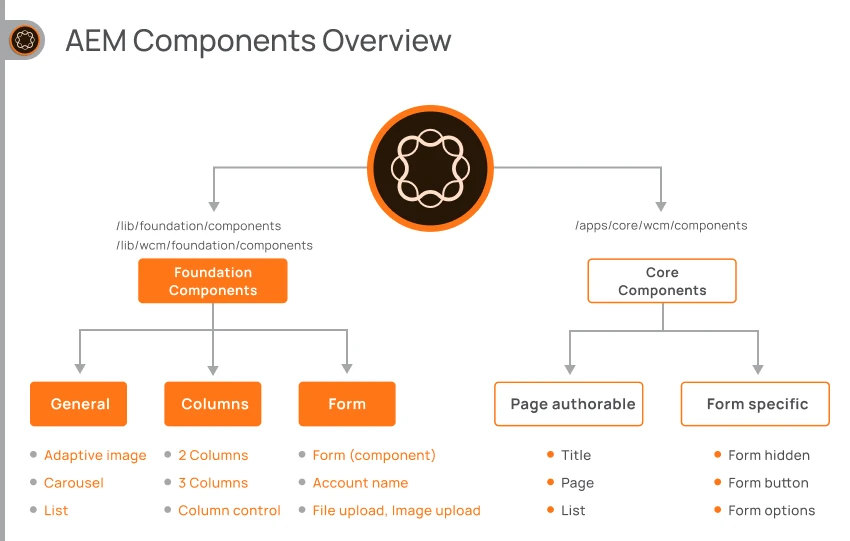
AEM Core Components
AEM Core Components are reusable production-ready components provided by Adobe.
Popular Core Components:
- Title
- Image
- Carousel
- Tabs
- Accordion
- Teaser
Benefits:
- SEO-friendly
- Accessible
- Optimized
- Enterprise-ready
Using Core Components is considered a best practice in modern AEM projects.
Best Practices for AEM Component Development
Use Sling Models
Avoid business logic in HTL.
Prefer Core Components
Extend existing functionality instead of building everything from scratch.
Build Reusable Components
Reusable components improve scalability and maintainability.
Optimize Performance
Best practices:
- Lazy loading
- Dispatcher caching
- Optimized clientlibs
- Efficient backend calls
AEM Cloud Service Architecture
Modern AEM Cloud projects generally contain:
core
ui.apps
ui.content
ui.frontend
dispatcher
These modules help separate:
- Backend logic
- Frontend code
- Dispatcher configuration
- Content structure
Testing AEM Components
AEM components can be tested using:
- JUnit
- Mockito
- AEM Mocks
Example:
@ExtendWith(AemContextExtension.class)class ProductModelTest { private final AemContext context = new AemContext(); @Test void testTitle() { // Test logic }}
Future of AEM Development
Modern AEM development is moving toward:
- Headless CMS
- Content Fragments
- GraphQL APIs
- Edge Delivery Services
- SPA integrations
- Cloud-native architecture
These trends are shaping the future of enterprise web development.
Conclusion
AEM Component Development is the foundation of building scalable and reusable enterprise digital experiences. A strong understanding of components enables developers to create maintainable, author-friendly, and high-performing websites.
To become proficient in AEM development, developers should focus on:
- HTL
- Sling Models
- Dialogs
- Clientlibs
- Core Components
- Editable Templates
Mastering these concepts is the first major step toward becoming an expert AEM Developer.
Subscribe to the Newsletter
Get the latest articles, tutorials, and tech insights delivered straight to your inbox. No spam, unsubscribe anytime.